 5bei.cn大模型教程网
目录
C# SwinV2 Stable Diffusion 提示词反推 Onnx Demo

介绍
模型出处github地址:https://github.com/SmilingWolf/SW-CV-ModelZoo
模型下载地址:https://huggingface.co/SmilingWolf/wd-v1-4-swinv2-tagger-v2
效果
CPU
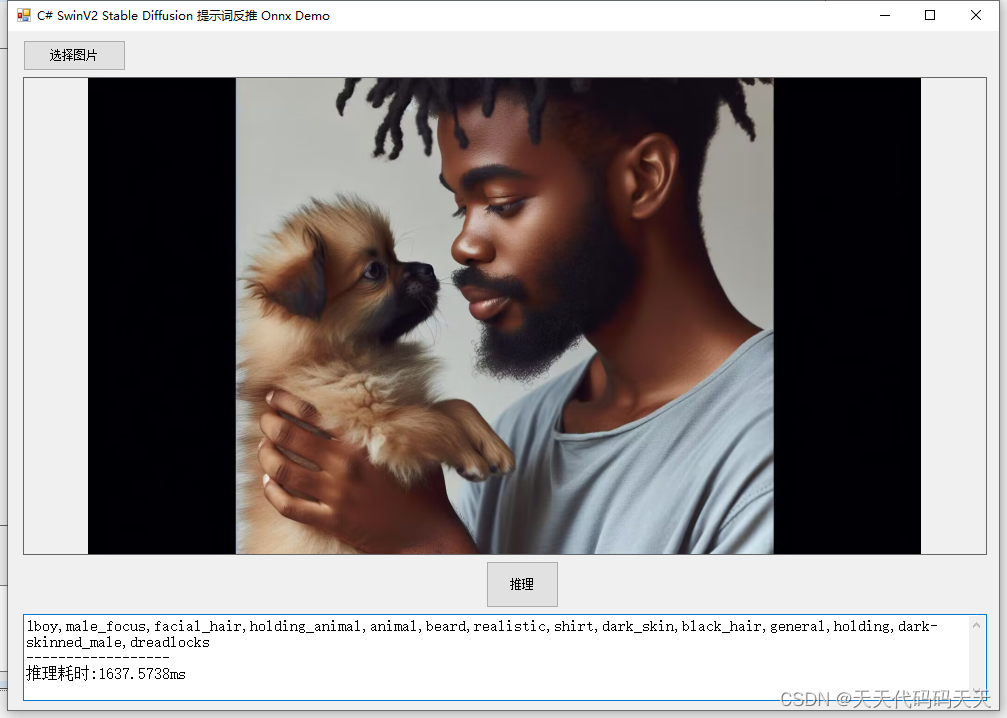
GPU
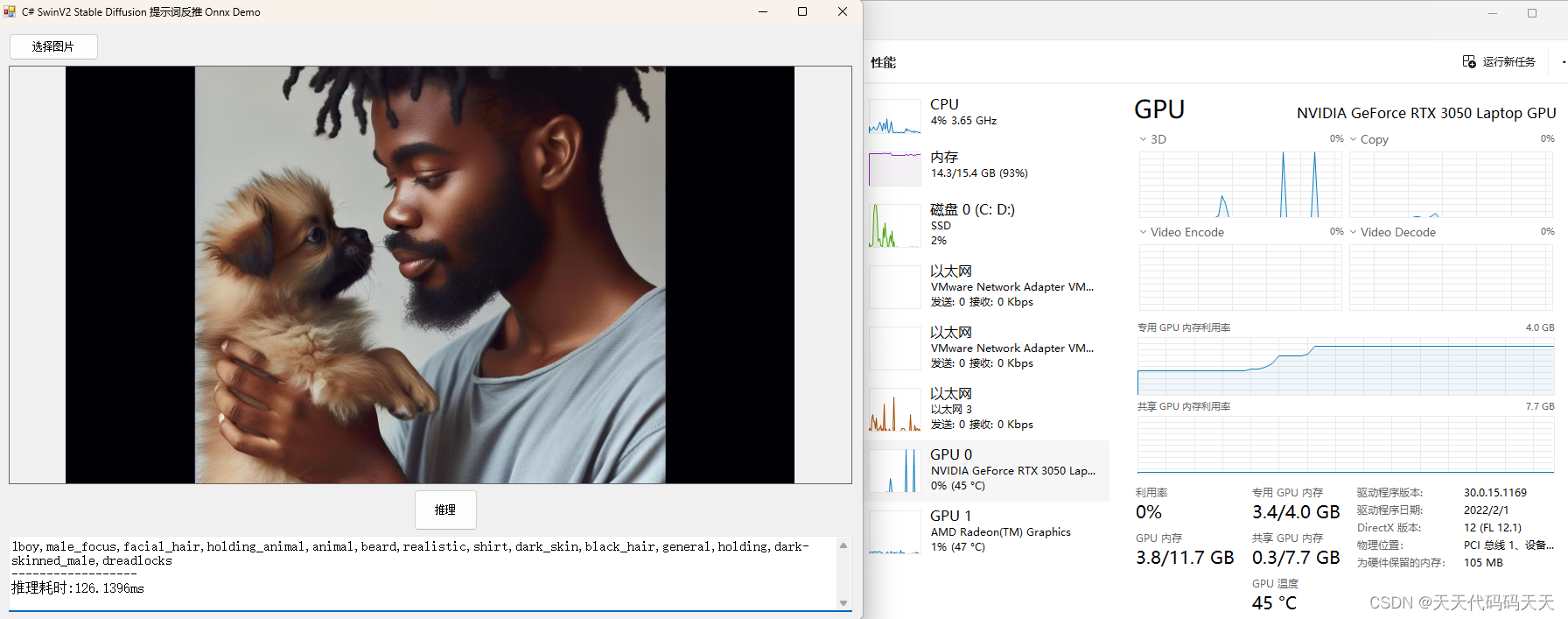
模型信息
Model Properties
————————-
—————————————————————
Inputs
————————-
name:input_1:0
tensor:Float[1, 448, 448, 3]
—————————————————————
Outputs
————————-
name:predictions_sigmoid
tensor:Float[1, 9083]
—————————————————————
项目

代码
using Microsoft.ML.OnnxRuntime;
using Microsoft.ML.OnnxRuntime.Tensors;
using OpenCvSharp;
using System;
using System.Collections.Generic;
using System.Drawing;
using System.IO;
using System.Linq;
using System.Text;
using System.Windows.Forms;
namespace Onnx_Demo
{
public partial class Form1 : Form
{
public Form1()
{
InitializeComponent();
}
string fileFilter = “*.*|*.bmp;*.jpg;*.jpeg;*.tiff;*.tiff;*.png”;
string image_path = “”;
DateTime dt1 = DateTime.Now;
DateTime dt2 = DateTime.Now;
string model_path;
Mat image;
SessionOptions options;
InferenceSession onnx_session;
Tensor input_tensor;
List input_container;
IDisposableReadOnlyCollection result_infer;
DisposableNamedOnnxValue[] results_onnxvalue;
Tensor result_tensors;
StringBuilder sb = new StringBuilder();
public string[] class_names;
private void button1_Click(object sender, EventArgs e)
{
OpenFileDialog ofd = new OpenFileDialog();
ofd.Filter = fileFilter;
if (ofd.ShowDialog() != DialogResult.OK) return;
pictureBox1.Image = null;
image_path = ofd.FileName;
pictureBox1.Image = new Bitmap(image_path);
textBox1.Text = “”;
image = new Mat(image_path);
}
private void button2_Click(object sender, EventArgs e)
{
if (image_path == “”)
{
return;
}
button2.Enabled = false;
textBox1.Text = “”;
sb.Clear();
Application.DoEvents();
//图片缩放
image = new Mat(image_path);
int max_image_length = image.Cols > image.Rows ? image.Cols : image.Rows;
Mat max_image = Mat.Zeros(new OpenCvSharp.Size(max_image_length, max_image_length), MatType.CV_8UC3);
Rect roi = new Rect(0, 0, image.Cols, image.Rows);
image.CopyTo(new Mat(max_image, roi));
float[] result_array;
// 将图片转为RGB通道
Mat image_rgb = new Mat();
Cv2.CvtColor(max_image, image_rgb, ColorConversionCodes.BGR2RGB);
Mat resize_image = new Mat();
Cv2.Resize(max_image, resize_image, new OpenCvSharp.Size(448, 448));
// 输入Tensor
for (int y = 0; y {
for (int x = 0; x {
input_tensor[0, y, x, 0] = resize_image.At(y, x)[0];
input_tensor[0, y, x, 1] = resize_image.At(y, x)[1];
input_tensor[0, y, x, 2] = resize_image.At(y, x)[2];
}
}
//将 input_tensor 放入一个输入参数的容器,并指定名称
input_container.Add(NamedOnnxValue.CreateFromTensor(“input_1:0”, input_tensor));
dt1 = DateTime.Now;
//运行 Inference 并获取结果
result_infer = onnx_session.Run(input_container);
dt2 = DateTime.Now;
// 将输出结果转为DisposableNamedOnnxValue数组
results_onnxvalue = result_infer.ToArray();
// 读取第一个节点输出并转为Tensor数据
result_tensors = results_onnxvalue[0].AsTensor();
result_array = result_tensors.ToArray();
List ltResult = new List();
ScoreIndex temp;
for (int i = 0; i {
temp = new ScoreIndex(i, result_array[i]);
ltResult.Add(temp);
}
//根据分数倒序排序,取前14个
var SortedByScore = ltResult.OrderByDescending(p => p.Score).ToList().Take(14);
foreach (var item in SortedByScore)
{
sb.Append(class_names[item.Index] + “,”);
}
sb.Length–; // 将长度减1来移除最后一个字符
sb.AppendLine(“”);
sb.AppendLine(“——————“);
// 只取分数最高的
// float max = result_array.Max();
// int maxIndex = Array.IndexOf(result_array, max);
// sb.AppendLine(class_names[maxIndex]+” “+ max.ToString(“P2”));
sb.AppendLine(“推理耗时:” + (dt2 – dt1).TotalMilliseconds + “ms”);
textBox1.Text = sb.ToString();
button2.Enabled = true;
}
private void Form1_Load(object sender, EventArgs e)
{
model_path = “model/model.onnx”;
// 创建输出会话,用于输出模型读取信息
options = new SessionOptions();
options.LogSeverityLevel = OrtLoggingLevel.ORT_LOGGING_LEVEL_INFO;
options.AppendExecutionProvider_CPU(0);// 设置为CPU上运行
// 创建推理模型类,读取本地模型文件
onnx_session = new InferenceSession(model_path, options);//model_path 为onnx模型文件的路径
// 输入Tensor
input_tensor = new DenseTensor(new[] { 1, 448, 448, 3 });
// 创建输入容器
input_container = new List();
image_path = “test_img/test.jpg”;
pictureBox1.Image = new Bitmap(image_path);
image = new Mat(image_path);
List str = new List();
StreamReader sr = new StreamReader(“model/lable.txt”);
string line;
while ((line = sr.ReadLine()) != null)
{
str.Add(line);
}
class_names = str.ToArray();
}
}
}
using Microsoft.ML.OnnxRuntime;
using Microsoft.ML.OnnxRuntime.Tensors;
using OpenCvSharp;
using System;
using System.Collections.Generic;
using System.Drawing;
using System.IO;
using System.Linq;
using System.Text;
using System.Windows.Forms;

namespace Onnx_Demo
{
    public partial class Form1 : Form
    {
        public Form1()
        {
            InitializeComponent();
        }

        string fileFilter = "*.*|*.bmp;*.jpg;*.jpeg;*.tiff;*.tiff;*.png";
        string image_path = "";
        DateTime dt1 = DateTime.Now;
        DateTime dt2 = DateTime.Now;
        string model_path;
        Mat image;

        SessionOptions options;
        InferenceSession onnx_session;
        Tensor input_tensor;
        List input_container;
        IDisposableReadOnlyCollection result_infer;
        DisposableNamedOnnxValue[] results_onnxvalue;

        Tensor result_tensors;

        StringBuilder sb = new StringBuilder();

        public string[] class_names;

        private void button1_Click(object sender, EventArgs e)
        {
            OpenFileDialog ofd = new OpenFileDialog();
            ofd.Filter = fileFilter;
            if (ofd.ShowDialog() != DialogResult.OK) return;
            pictureBox1.Image = null;
            image_path = ofd.FileName;
            pictureBox1.Image = new Bitmap(image_path);
            textBox1.Text = "";
            image = new Mat(image_path);
        }

        private void button2_Click(object sender, EventArgs e)
        {
            if (image_path == "")
            {
                return;
            }

            button2.Enabled = false;
            textBox1.Text = "";
            sb.Clear();
            Application.DoEvents();

            //图片缩放
            image = new Mat(image_path);
            int max_image_length = image.Cols > image.Rows ? image.Cols : image.Rows;
            Mat max_image = Mat.Zeros(new OpenCvSharp.Size(max_image_length, max_image_length), MatType.CV_8UC3);
            Rect roi = new Rect(0, 0, image.Cols, image.Rows);
            image.CopyTo(new Mat(max_image, roi));

            float[] result_array;

            // 将图片转为RGB通道
            Mat image_rgb = new Mat();
            Cv2.CvtColor(max_image, image_rgb, ColorConversionCodes.BGR2RGB);
            Mat resize_image = new Mat();
            Cv2.Resize(max_image, resize_image, new OpenCvSharp.Size(448, 448));

            // 输入Tensor
            for (int y = 0; y (y, x)[0];
                    input_tensor[0, y, x, 1] = resize_image.At(y, x)[1];
                    input_tensor[0, y, x, 2] = resize_image.At(y, x)[2];
                }
            }

            //将 input_tensor 放入一个输入参数的容器,并指定名称
            input_container.Add(NamedOnnxValue.CreateFromTensor("input_1:0", input_tensor));

            dt1 = DateTime.Now;
            //运行 Inference 并获取结果
            result_infer = onnx_session.Run(input_container);
            dt2 = DateTime.Now;

            // 将输出结果转为DisposableNamedOnnxValue数组
            results_onnxvalue = result_infer.ToArray();

            // 读取第一个节点输出并转为Tensor数据
            result_tensors = results_onnxvalue[0].AsTensor();

            result_array = result_tensors.ToArray();

            List ltResult = new List();
            ScoreIndex temp;
            for (int i = 0; i  p.Score).ToList().Take(14);

            foreach (var item in SortedByScore)
            {
                sb.Append(class_names[item.Index] + ",");
            }
            sb.Length--; // 将长度减1来移除最后一个字符

            sb.AppendLine("");
            sb.AppendLine("------------------");

            // 只取分数最高的
            // float max = result_array.Max();
            // int maxIndex = Array.IndexOf(result_array, max);
            // sb.AppendLine(class_names[maxIndex]+" "+ max.ToString("P2"));

            sb.AppendLine("推理耗时:" + (dt2 - dt1).TotalMilliseconds + "ms");
            textBox1.Text = sb.ToString();
            button2.Enabled = true;
        }

        private void Form1_Load(object sender, EventArgs e)
        {
            model_path = "model/model.onnx";

            // 创建输出会话,用于输出模型读取信息
            options = new SessionOptions();
            options.LogSeverityLevel = OrtLoggingLevel.ORT_LOGGING_LEVEL_INFO;
            options.AppendExecutionProvider_CPU(0);// 设置为CPU上运行

            // 创建推理模型类,读取本地模型文件
            onnx_session = new InferenceSession(model_path, options);//model_path 为onnx模型文件的路径

            // 输入Tensor
            input_tensor = new DenseTensor(new[] { 1, 448, 448, 3 });
            // 创建输入容器
            input_container = new List();

            image_path = "test_img/test.jpg";
            pictureBox1.Image = new Bitmap(image_path);
            image = new Mat(image_path);

            List str = new List();
            StreamReader sr = new StreamReader("model/lable.txt");
            string line;
            while ((line = sr.ReadLine()) != null)
            {
                str.Add(line);
            }
            class_names = str.ToArray();
        }

    }
}
下载
文章来源于互联网:C# SwinV2 Stable Diffusion 提示词反推 Onnx Demo
相关推荐: 开源模型应用落地-语音转文本-whisper模型-AIGC应用探索(二)
一、前言 语音转文本技术具有重要价值。它能提高信息记录和处理的效率,使人们可以快速将语音内容转换为可编辑、可存储的文本形式,方便后续查阅和分析。在教育领域,可帮助学生更好地记录课堂重点;在办公场景中,能简化会议记录工作。同时,该技术也为残障人士提供了便…




