 5bei.cn大模型教程网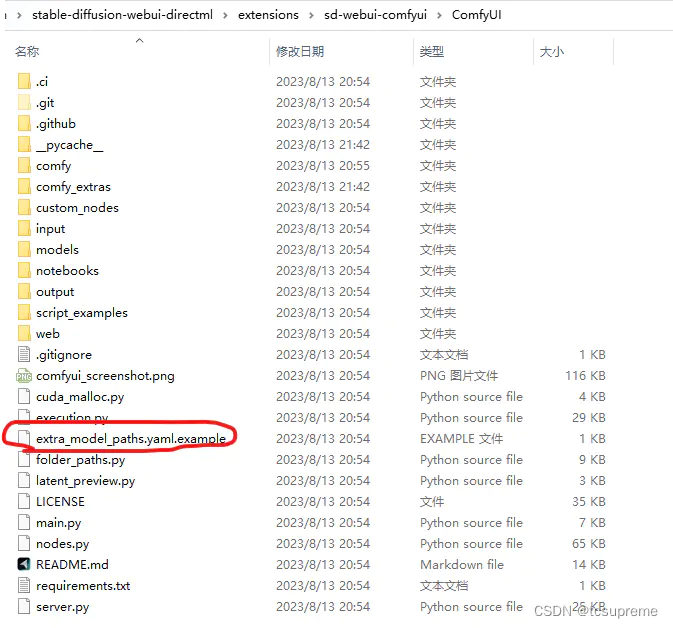
1.修改上图extra_model_paths.yaml.example为extra_model_paths.yaml
#Rename this to extra_model_paths.yaml and ComfyUI will load it

#config for a1111 ui
#all you have to do is change the base_path to where yours is installed
a111:
    base_path: path/to/stable-diffusion-webui/

    checkpoints: models/Stable-diffusion
    configs: models/Stable-diffusion
    vae: models/VAE
    loras: |
         models/Lora
         models/LyCORIS
    upscale_models: |
                  models/ESRGAN
                  models/RealESRGAN
                  models/SwinIR
    embeddings: embeddings
    hypernetworks: models/hypernetworks
    controlnet: models/ControlNet

#other_ui:
#    base_path: path/to/ui
#    checkpoints: models/checkpoints
#    gligen: models/gligen
#    custom_nodes: path/custom_nodes
2.将base_path: path/to/stable-diffusion-webui/修改成你的/stable-diffusion-webui安装路径(例如:base_p: D:/stable-diffusion-webui)
做个记录
文章来源于互联网:stable-diffusion的webui和comfyuig共享模型路径
相关推荐: 【Stable Diffusion】Roop换脸插件,全网最简单傻瓜式安装教程
今天也是应粉丝的要求,出一篇关于roop插件安装的教程。之前已经写过两篇关于roop插件的使用文章,它确实是目前最方便快捷的一款换脸插件了。 无需Lora,一键换脸插件Roop(点击下方图片跳转) 多人物脸部替换,一键换脸插件Roop(2)(点击下方图片跳转)…




