 5bei.cn大模型教程网
这篇讲解很详细,可以参考:https://zhuanlan.zhihu.com/p/634573765
附上苏神的讲解:生成扩散模型漫谈(二十二):信噪比与大图生成(上) – 科学空间|Scientific Spaces
其中,autoencoder的学习可以参考:https://juejin.cn/post/7238769796351639612
1、目的
DM的train和infer均需大量的时间和显存
2、方法
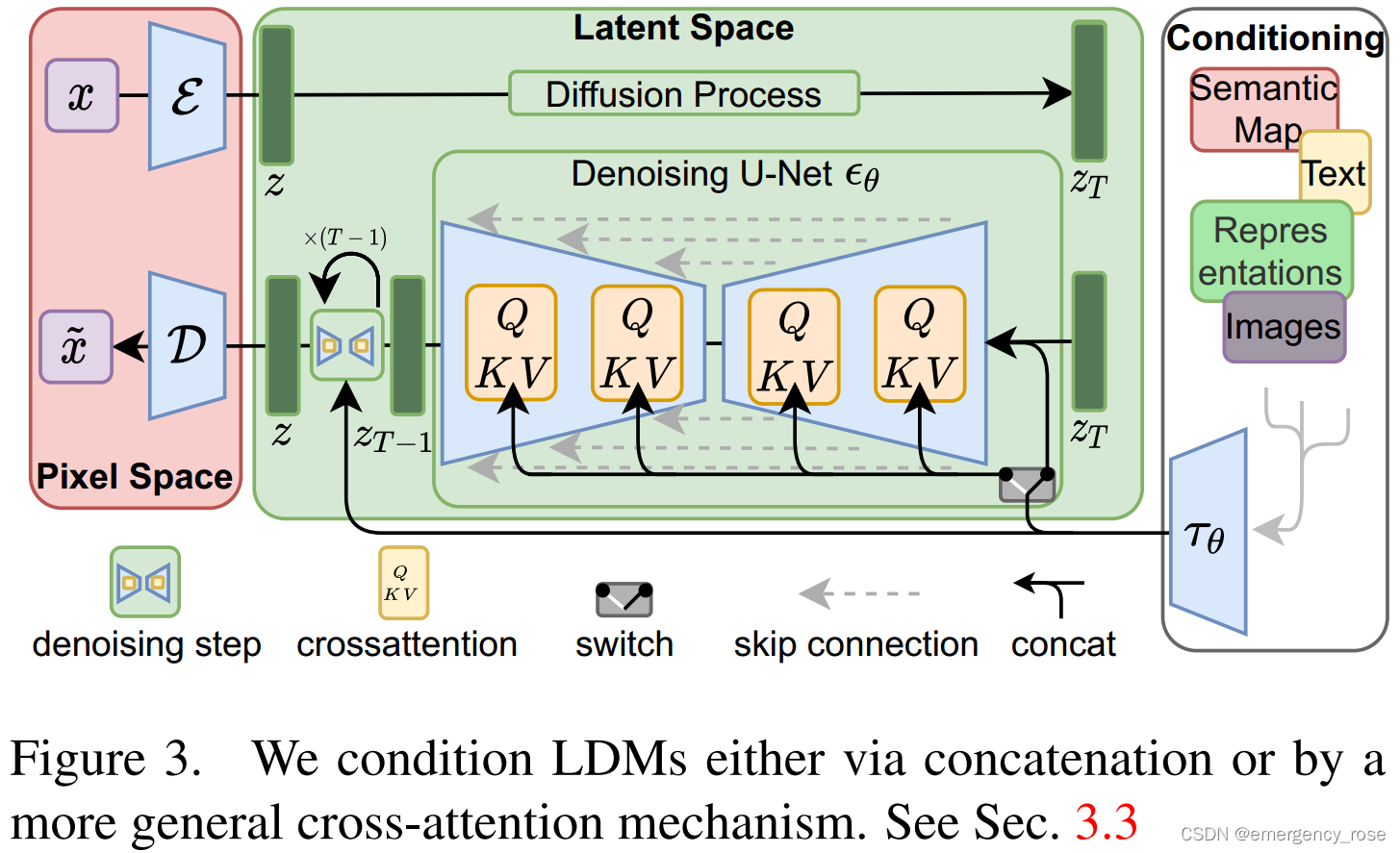
1)autoencoder

-> 将数据映射到感知上等效的、低维度的表示空间
-> 只需训练一次,就可以被应用到多个DM训练过程中,也可以用于其他下游任务 (如single-image CLIP-guided synthesis)
-> 压缩程度可选
-> perceptual loss + patch-based adversarial objective
-> encoder  ,
,
-> decoder D,
->  ,
, ,下采样
,下采样 。LDM-1对应着pixel-based DM,LDM-4和-8最优
-> 为了避免潜空间的方差过高,可以采用两种正则化:KL-reg和VQ-reg
2)在潜空间上训练DM,即Latent Diffusion Models (LDMs)
-> 
->  :time-conditional UNet
3)cross-attention
-> 用于多模态条件输入
->  : domain specific encoder,将y映射为中间表示
-> 

 为UNet应用
 后(flattened) intermediate representation
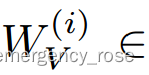
 均为learnable映射矩阵
->  ,同步优化和,其中可以根据domain-specific experts来参数化
3、应用
convolutional fashion,~ px
px
1)unconditional
2)conditional (text,bounding boxes,high-resolution synthesis,…)
-> inpainting
-> stochastic super-resolution
-> semantic synthesis
-> class-conditional
-> text-to-image
-> layout-to-image
文章来源于互联网:[Stable Diffusion/LDM] High-Resolution Image Synthesis with Latent Diffusion Models
相关推荐: Stable Diffusion WebUI安装SadTalker插件
引言 AI绘画已经火了有几个月了,不知道大家有没有去体验一下呢? 要说可操作性最强的莫过于Stable Diffusion WebUI,简称SD,下面我们就来介绍一下如何给SD安装上SadTalker插件,记录一下安装和使用过程中踩过的坑~ 安装插件 通过St…




