 5bei.cn大模型教程网
简介
- stable-diffusion-webui是AI绘画 Stable Diffusion浏览器UI界面,为用户提供了一个简单、直观的方式来利用 Stable Diffusion 技术创建视觉内容。
下载
- 官方地址 https://github.com/AUTOMATIC1111/stable-diffusion-webui

- 可以用git命令clone,或者直接下载。
- 我使用的是git clone (建议用ssh方式,要先配 SSH keys https://github.com/settings/keys),在命令行中输入如下命令
git clone git@github.com:AUTOMATIC1111/stable-diffusion-webui.git
conda环境
-
如果不知道如何安装conda或在pycharm中怎么应用conda环境,可以看我这篇文章 https://blog.csdn.net/baidu_19473529/article/details/143442416,就不再赘述。
-
创建sd环境
 conda create -n sd python=3.10.6
conda activate sd
- 在stable-diffusion-webui根目录下运行安装依赖命令。
pip install -r requirements.txt
配置环境变量
- 我没有独显,是以CPU运行。先加入使用CPU来AI绘画的变量。
CUDA_VISIBLE_DEVICES=-1
COMMANDLINE_ARGS=--use-cpu all --no-half --precision full --skip-torch-cuda-test

修改launch_utils.py文件
-
为什么要修改launch_utils.py文件呢?
- 1、里面pip install遇上大文件会超时,加上–timeout=9999
- 2、clone仓库时,用的https方式很慢,改为ssh方式。这也是我推荐先配置好SSH keys的意义。
-
主要集中在
prepare_environment方法。
def prepare_environment():
    torch_index_url = os.environ.get('TORCH_INDEX_URL', "https://download.pytorch.org/whl/cu121")
    torch_command = os.environ.get('TORCH_COMMAND', f"pip install --timeout=9999 torch==2.1.2 torchvision==0.16.2 --extra-index-url {torch_index_url}")
    if args.use_ipex:
        if platform.system() == "Windows":
            # The "Nuullll/intel-extension-for-pytorch" wheels were built from IPEX source for Intel Arc GPU: https://github.com/intel/intel-extension-for-pytorch/tree/xpu-main
            # This is NOT an Intel official release so please use it at your own risk!!
            # See https://github.com/Nuullll/intel-extension-for-pytorch/releases/tag/v2.0.110%2Bxpu-master%2Bdll-bundle for details.
            #
            # Strengths (over official IPEX 2.0.110 windows release):
            #   - AOT build (for Arc GPU only) to eliminate JIT compilation overhead: https://github.com/intel/intel-extension-for-pytorch/issues/399
            #   - Bundles minimal oneAPI 2023.2 dependencies into the python wheels, so users don't need to install oneAPI for the whole system.
            #   - Provides a compatible torchvision wheel: https://github.com/intel/intel-extension-for-pytorch/issues/465
            # Limitation:
            #   - Only works for python 3.10
            url_prefix = "https://github.com/Nuullll/intel-extension-for-pytorch/releases/download/v2.0.110%2Bxpu-master%2Bdll-bundle"
            torch_command = os.environ.get('TORCH_COMMAND', f"pip install --timeout=9999 {url_prefix}/torch-2.0.0a0+gite9ebda2-cp310-cp310-win_amd64.whl {url_prefix}/torchvision-0.15.2a0+fa99a53-cp310-cp310-win_amd64.whl {url_prefix}/intel_extension_for_pytorch-2.0.110+gitc6ea20b-cp310-cp310-win_amd64.whl")
        else:
            # Using official IPEX release for linux since it's already an AOT build.
            # However, users still have to install oneAPI toolkit and activate oneAPI environment manually.
            # See https://intel.github.io/intel-extension-for-pytorch/index.html#installation for details.
            torch_index_url = os.environ.get('TORCH_INDEX_URL', "https://pytorch-extension.intel.com/release-whl/stable/xpu/us/")
            torch_command = os.environ.get('TORCH_COMMAND', f"pip install --timeout=9999 torch==2.0.0a0 intel-extension-for-pytorch==2.0.110+gitba7f6c1 --extra-index-url {torch_index_url}")
    requirements_file = os.environ.get('REQS_FILE', "requirements_versions.txt")
    requirements_file_for_npu = os.environ.get('REQS_FILE_FOR_NPU', "requirements_npu.txt")

    xformers_package = os.environ.get('XFORMERS_PACKAGE', 'xformers==0.0.23.post1')
    clip_package = os.environ.get('CLIP_PACKAGE', "https://github.com/openai/CLIP/archive/d50d76daa670286dd6cacf3bcd80b5e4823fc8e1.zip")
    openclip_package = os.environ.get('OPENCLIP_PACKAGE', "https://github.com/mlfoundations/open_clip/archive/bb6e834e9c70d9c27d0dc3ecedeebeaeb1ffad6b.zip")

    assets_repo = os.environ.get('ASSETS_REPO', "git@github.com:AUTOMATIC1111/stable-diffusion-webui-assets.git")
    stable_diffusion_repo = os.environ.get('STABLE_DIFFUSION_REPO', "git@github.com:Stability-AI/stablediffusion.git")
    stable_diffusion_xl_repo = os.environ.get('STABLE_DIFFUSION_XL_REPO', "git@github.com:Stability-AI/generative-models.git")
    k_diffusion_repo = os.environ.get('K_DIFFUSION_REPO', 'git@github.com:crowsonkb/k-diffusion.git')
    blip_repo = os.environ.get('BLIP_REPO', 'git@github.com:salesforce/BLIP.git')
...省略...
运行stable-diffusion-webui
-
定位到
launch.py文件,右键运行。
-
如无意外,浏览器会自动打开http://127.0.0.1:7860/

-
注意:此时还没有模型。还无法生成图片。
下载模型
-
据我所知有两个地方可以下载模型。
- 1、huggingface 可以说是人工智能界的Github。
- 2、civitai ,专门用来分享Stable Diffusion相关的资源。
-
我是在huggingface中下载的模型。有许多模型,我选择的是下载量最多的。

-
Text-to-Image表示 文本生成图片。进入详情。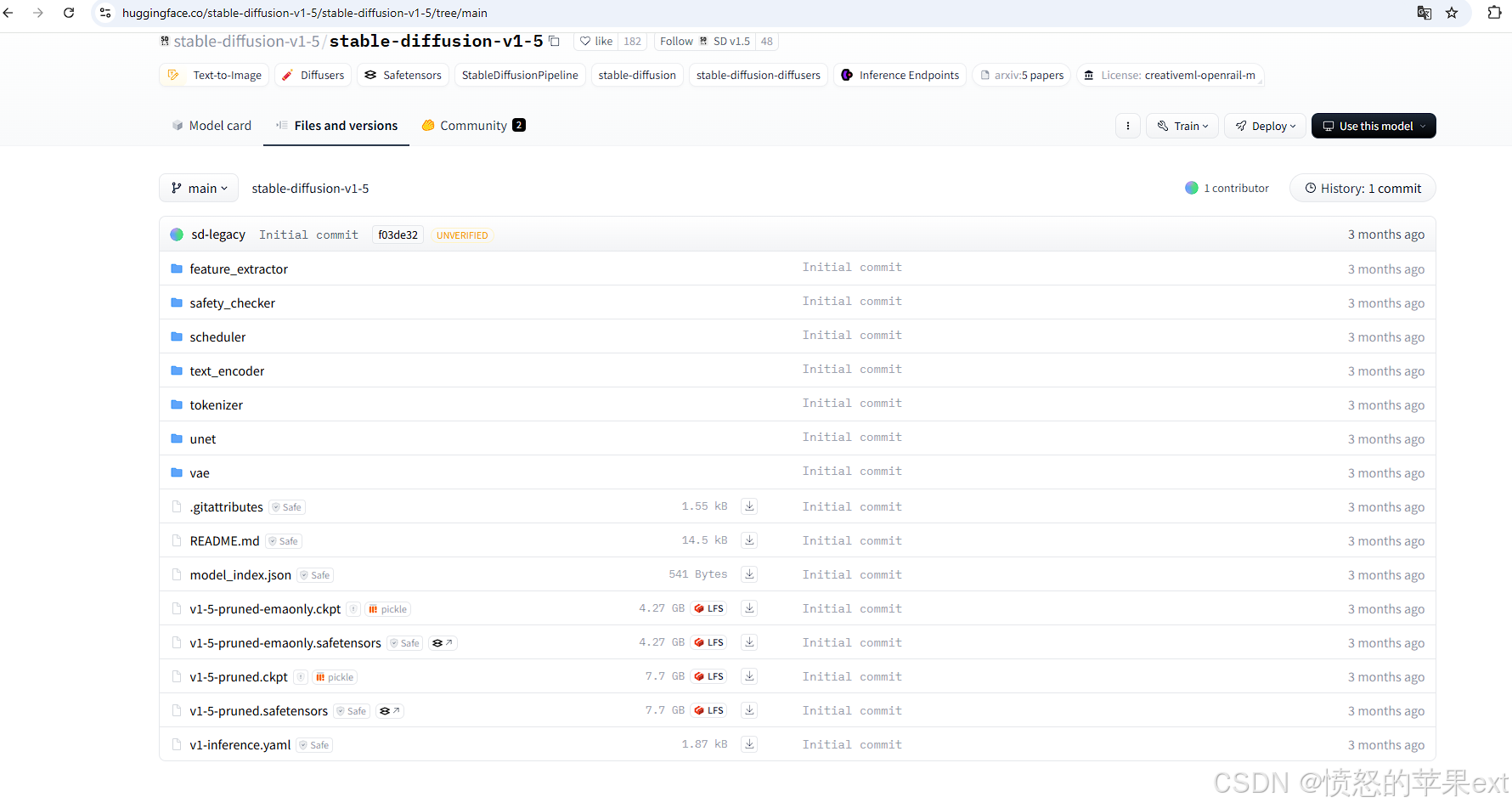
-
选择下载副档名为
.ckpt或.safetensors的模型。后者因不具备执行程式码的能力因此较前者安全。至於-pruned代表模型有刪减过大小。 -
下载完成后,放在
根目录/models/Stable-diffusion。重启stable-diffusion-webui。
文本生成图片
-
选择模型,第一次选择后要等待一会儿。

-
然后输入提示词,
a dog。点击Generate。等待一会儿。

-
成功生成了一只狗的图片。
参考
- https://blog.csdn.net/wapecheng/article/details/132543920
- https://blog.yanghong.dev/stable-diffusion-webui-model-download/
文章来源于互联网:stable-diffusion-webui在conda pycharm中运行
1.前言: 最近看Stable Diffusion开源了,据说比Disco Diffusion更快,于是从git上拉取了项目尝试本地部署了,记录分享一下过程~ 这里是官网介绍:https://stability.ai/blog/stable-diffusion…




