 5bei.cn大模型教程网
概要
在上一个文章咱们已经实现了一个基于llama3.1的大语言模型(LLM模型)。今天咱们继续来使用Omega-AI深度学习引擎从零实现一个stable diffusion模型,并实现文生图场景应用。
Omega-AI深度学习引擎
Omega-AI:基于java打造的深度学习框架,帮助你快速搭建神经网络,实现训练或测试模型,支持多卡训练,框架目前支持BP神经网络、卷积神经网络、循环神经网络、vgg16、resnet、yolo、lstm、transformer、diffusion、gpt、llama、llava等模型的构建,目前引擎最新版本支持CUDA和CUDNN两种GPU加速方式,关于GPU加速的环境配置与jcuda版本jar包的对应依赖。
效果展示
基于stable diffusion模型实现文生图
文生图演示图
| 文本1 | 图片1 | 文本2 | 图片2 |
|---|---|---|---|
| a highly detailed anime landscape,big tree on the water, epic sky,golden grass,detailed. |  |
3d art of a golden tree in the river,with intricate flora and flowing water,detailed. |  |
| a vibrant anime mountain lands |  |
a dark warrior in epic armor stands among glowing crimson leaves in a mystical forest. |  |
| cute fluffy panda, anime, ghibli style, pastel colors, soft shadows, detailed fur, vibrant eyes, fantasy setting, digital art, 3d, by kazuo oga |  |
a epic city,3d,detailed. | 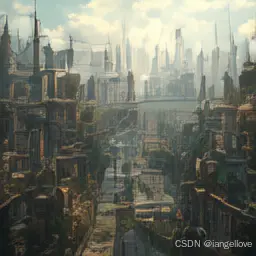 |
Quick Start
环境配置
- JDK1.8以上
- CUDA11.X/12.X
// 检查当前安装的CUDA版本
nvcc --version
安装CUDA与CUDNN
https://developer.nvidia.com/cuda-toolkit-archive
下载与配置Omega-AI深度学习引擎
- 下载Omega-AI深度学习引擎
git clone https://github.com/dromara/Omega-AI.git
git clone https://gitee.com/dromara/omega-ai.git
- 根据当前CUDA版本配置JCUDA依赖
打开Omega-AI pom.xml文件,根据当前CUDA版本修改依赖提示:如您安装的cuda版本为12.x,请使用jcuda12.0.0版本
	properties>
	    java.version>1.8java.version>

		jcuda.version>11.8.0jcuda.version>
		project.build.sourceEncoding>UTF-8project.build.sourceEncoding>
		project.reporting.outputEncoding>UTF-8project.reporting.outputEncoding>
		resource.delimiter>@resource.delimiter>
	    maven.compiler.source>${java.version}maven.compiler.source>
	    maven.compiler.target>${java.version}maven.compiler.target>
	properties>
stable diffusion架构
传统的扩散模型有两大限制:1.输入图片尺寸与计算量大小限制导致效率低下,2.只能输入随机噪声导致无法控制输出结果。而stable diffsuion引入了latent space概念,使得在其可以在较少的内存占用完成高清的图片生成。在解决只能输入随机噪声的问题上,stable diffusion使用了clip text的text encoder把文本信息作为条件输入到text conditioned lantent unet当中,并使用cross attention把text条件与图像融合。总结以上内容,stable diffsuion总共分为三大组件:VAE(变分自编码器)负责把图片编码成相对较小的latent space数据和解码latent space还原成正常大小的图片。CLIP TEXT当中的text encoder负责把文本内容编码成77*512的 token embeddings。lantent unet负责结合条件生成latent space,与传统的diffusion模型的unet相比,stable diffusion的unet使用的是cross attention机制,目的就是为了融合条件信息。以下是stable diffusion流程图: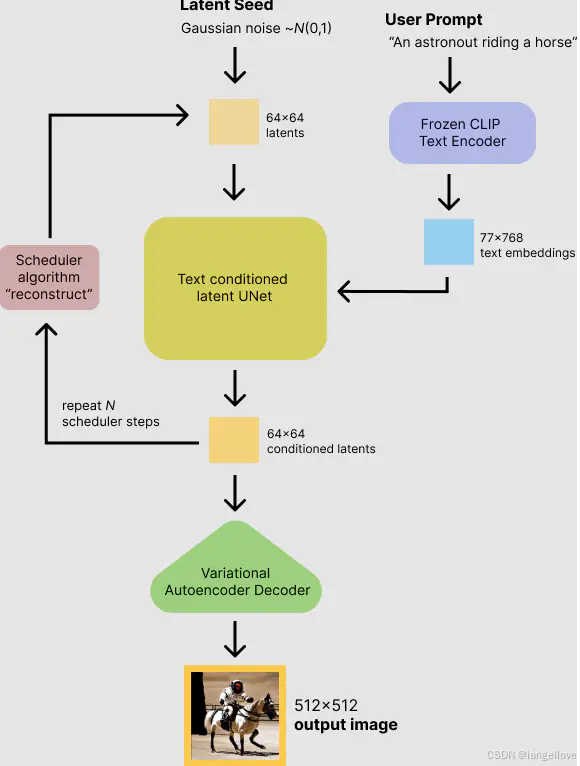
1 STEP 训练VQ-VAE(变分自编码器)
1.1下载与预处理训练数据
- 本次任务将使用开源动画风格的图文对数据集【rapidata】点击下载
- 处理图片大小统一为256 * 256或者512 * 512
- 制作元数据并存储为json文件,数据格式为:[{“id”: “0”, “en”: “cinematic bokeh: ironcat, sharp focus on the cat’s eyes, blurred background, dramatic chiaroscuro lighting, deep shadows, high contrast, rich textures, high resolution”}]
提示:可下载已经处理好的数据集
点击下载已处理后的数据集 - 使用数据加载器读取训练数据,代码如下:
	int batchSize = 2;
   	int imageSize = 256;
   	float[] mean = new float[] {0.5f, 0.5f, 0.5f};
    float[] std = new float[] {0.5f, 0.5f, 0.5f};
   	String imgDirPath = "I:datasetsd-animeanime_op256";
   	DiffusionImageDataLoader dataLoader = new DiffusionImageDataLoader(imgDirPath, imageSize, imageSize, batchSize, true, false, mean, std);
1.2 创建VQ-VAE模型
		/**
   		 * LossType lossType: 损失函数
   		 * UpdaterType updater, 参数更新方法
   		 * int z_dims, 输出latent space维度
   		 * int latendDim, 输出latent space通道数
   		 * latent space形状为[batchSize, latendDim, z_dims, z_dims]
   		 * int num_res_blocks, 每个采样层所包含的residual层数
   		 * int imageSize, 输入图片大小
   		 * int[] ch_mult, unet上下采样层通道倍数
   		 * int ch, unet上下采样层通道基数
   		 */
   		VQVAE2 network = new VQVAE2(LossType.MSE, UpdaterType.adamw, z_dims, latendDim, num_vq_embeddings, imageSize, ch_mult, ch, num_res_blocks);
1.3 创建LPIPS模型
为了增强vae的还原图片的清晰度,在训练vae模型的过程中添加lpips(感知损失),该模型用于度量两张图片之间的差别。
  /**
   * LossType lossType: 损失函数(均方差损失函数)
   * UpdaterType updater, 参数更新方法
   * int imageSize, 输入图片大小
   */
  LPIPS lpips = new LPIPS(LossType.MSE, UpdaterType.adamw, imageSize);
完整训练代码如下:
  public static void anime_vqvae2_lpips_gandisc_32_nogan() {
  	try {
  		nt batchSize = 16;
  		int imageSize = 256;
  		int z_dims = 32;
  		int latendDim = 4;
  		int num_vq_embeddings = 512;
  		int num_res_blocks = 1;
  		int[] ch_mult = new int[] {1, 2, 2, 4};
  		int ch = 32;
  		float[] mean = new float[] {0.5f, 0.5f, 0.5f};
  		float[] std = new float[] {0.5f, 0.5f, 0.5f};

  		String imgDirPath = "I:datasetsd-animeanime_op256";
  		DiffusionImageDataLoader dataLoader = new DiffusionImageDataLoader(imgDirPath, imageSize, imageSize, batchSize, true, false, mean, std);
  		/**
  		 * LossType lossType: 损失函数
  		 * UpdaterType updater, 参数更新方法
  		 * int z_dims, 输出latent space维度
  		 * int latendDim, 输出latent space通道数
  		 * latent space形状为[batchSize, latendDim, z_dims, z_dims]
  		 * int num_res_blocks, 每个采样层所包含的residual层数
  		 * int imageSize, 输入图片大小
  		 * int[] ch_mult, unet上下采样层通道倍数
  		 * int ch, unet上下采样层通道基数
  		 */
  		VQVAE2 network = new VQVAE2(LossType.MSE, UpdaterType.adamw, z_dims, latendDim, num_vq_embeddings, imageSize, ch_mult, ch, num_res_blocks);
  		network.CUDNN = true;
  		network.learnRate = 0.001f;

  		LPIPS lpips = new LPIPS(LossType.MSE, UpdaterType.adamw, imageSize);
  		//加载权重
  		String lpipsWeight = "H:modellpips.json";
  		LPIPSTest.loadLPIPSWeight(LagJsonReader.readJsonFileSmallWeight(lpipsWeight), lpips, false);
  		lpips.CUDNN = true;

  		MBSGDOptimizer optimizer = new MBSGDOptimizer(network, 200, 0.00001f, batchSize, LearnRateUpdate.CONSTANT, false);
  		optimizer.trainVQVAE2_lpips_nogan(dataLoader, lpips);

  		String save_model_path = "/omega/models/anime_vqvae2_256.model";
  		ModelUtils.saveModel(network, save_model_path);

  	} catch (Exception e) {
  		// TODO: handle exception
  		e.printStackTrace();
  	}
  }
VQ-VAE演示图
| 原图 | VQ-VAE | 原图 | VQ-VAE |
|---|---|---|---|
 |
 |
 |
 |
 |
 |
 |
 |
2 STEP 训练diffusion unet cond(条件扩散模型)
2.1 创建与加载Clip Text Encoder
本次任务使用clip-vit-base-patch32的encoder部分作为text encoder。
 	/**
	 * clipText shape[batchSize, 77, 512]
	 */
	int time = maxContextLen;  //文本最大token长度
	int maxPositionEmbeddingsSize = 77;  //文本最大token长度
	int vocabSize = 49408;  //tokenizer词表长度
	int headNum = 8;  //多头注意力头数
	int n_layers = 12;  //CLIPEncoderLayer编码层层数
	int textEmbedDim = 512;  //文本嵌入输出维度
	ClipTextModel clip = new ClipTextModel(LossType.MSE, UpdaterType.adamw, headNum, time, vocabSize, textEmbedDim, maxPositionEmbeddingsSize, n_layers);
	clip.CUDNN = true;
	clip.time = time;
	clip.RUN_MODEL = RunModel.EVAL; //设置推理模式

	String clipWeight = "H:modelclip-vit-base-patch32.json";
	ClipModelUtils.loadWeight(LagJsonReader.readJsonFileSmallWeight(clipWeight), clip, true);
2.2 创建与加载VQ-VAE模型
 	/**
	 * LossType lossType: 损失函数
	 * UpdaterType updater, 参数更新方法
	 * int z_dims, 输出latent space维度
	 * int latendDim, 输出latent space通道数
	 * latent space形状为[batchSize, latendDim, z_dims, z_dims]
	 * int num_res_blocks, 每个采样层所包含的residual层数
	 * int imageSize, 输入图片大小
	 * int[] ch_mult, unet上下采样层通道倍数
	 * int ch, unet上下采样层通道基数
	 */
	VQVAE2 vae = new VQVAE2(LossType.MSE, UpdaterType.adamw, z_dims, latendDim, num_vq_embeddings, imageSize, ch_mult, ch, num_res_blocks);
	vae.RUN_MODEL = RunModel.EVAL;  //设置推理模式
	//加载已训练好的vae模型权重
	String vaeModel = "anime_vqvae2_256.model";
	ModelUtils.loadModel(vae, vaeModel);
2.3 创建Diffusion UNet Cond模型(条件扩散模型)
 	int unetHeadNum = 8;  //unet多头注意力头数
	int[] downChannels = new int[] {128, 256, 512, 768};  //下采样通道数
	int numLayer = 2;  //每层采样层的ResidualBlock个数
	int timeSteps = 1000;  //扩散时间步数
	int tEmbDim = 512;  //时序嵌入维度
	int latentSize = 32;  //latent space维度
	int groupNum = 32;  //group norm分组数

	DiffusionUNetCond2 unet = new DiffusionUNetCond2(LossType.MSE, UpdaterType.adamw, latendDim, latentSize, latentSize, downChannels, unetHeadNum, numLayer, timeSteps, tEmbDim, maxContextLen, textEmbedDim, groupNum);
	unet.CUDNN = true;
	unet.learnRate = 0.0001f;
完整训练代码如下:
	public static void tiny_sd_train_anime_32() throws Exception {
		String labelPath = "I:datasetsd-animeanime_opdata.json";
		String imgDirPath = "I:datasetsd-animeanime_op256";
		boolean horizontalFilp = true;
		int imgSize = 256;
		int maxContextLen = 77;
		int batchSize = 8;
		float[] mean = new float[] {0.5f, 0.5f,0.5f};
		float[] std = new float[] {0.5f, 0.5f,0.5f};
		//加载bpe tokenizer分词器
		String vocabPath = "H:modelbpe_tokenizervocab.json";
		String mergesPath = "H:modelbpe_tokenizermerges.txt";
		BPETokenizerEN bpe = new BPETokenizerEN(vocabPath, mergesPath, 49406, 49407);

		SDImageDataLoaderEN dataLoader = new SDImageDataLoaderEN(bpe, labelPath, imgDirPath, imgSize, imgSize, maxContextLen, batchSize, horizontalFilp, mean, std);

		/**
		 * clipText shape[batchSize, 77, 512]
		 */
		int time = maxContextLen;  //文本最大token长度
		int maxPositionEmbeddingsSize = 77;  //文本最大token长度
		int vocabSize = 49408;  //tokenizer词表长度
		int headNum = 8;  //多头注意力头数
		int n_layers = 12;  //CLIPEncoderLayer编码层层数
		int textEmbedDim = 512;  //文本嵌入输出维度
		ClipTextModel clip = new ClipTextModel(LossType.MSE, UpdaterType.adamw, headNum, time, vocabSize, textEmbedDim, maxPositionEmbeddingsSize, n_layers);
		clip.CUDNN = true;
		clip.time = time;
		clip.RUN_MODEL = RunModel.EVAL;

		String clipWeight = "H:modelclip-vit-base-patch32.json";
		ClipModelUtils.loadWeight(LagJsonReader.readJsonFileSmallWeight(clipWeight), clip, true);

		int z_dims = 128;
		int latendDim = 4;
		int num_vq_embeddings = 512;
		int num_res_blocks = 2;
		int[] ch_mult = new int[] {1, 2, 2, 4};
		int ch = 128;

		VQVAE2 vae = new VQVAE2(LossType.MSE, UpdaterType.adamw, z_dims, latendDim, num_vq_embeddings, imgSize, ch_mult, ch, num_res_blocks);
		vae.CUDNN = true;
		vae.learnRate = 0.001f;
		vae.RUN_MODEL = RunModel.EVAL;
		String vaeModel = "anime_vqvae2_256.model";
		ModelUtils.loadModel(vae, vaeModel);

		int unetHeadNum = 8;  //unet多头注意力头数
		int[] downChannels = new int[] {128, 256, 512, 768};  //下采样通道数
		int numLayer = 2;  //每层采样层的ResidualBlock个数
		int timeSteps = 1000;  //扩散时间步数
		int tEmbDim = 512;  //时序嵌入维度
		int latentSize = 32;  //latent space维度
		int groupNum = 32;  //group norm分组数

		DiffusionUNetCond2 unet = new DiffusionUNetCond2(LossType.MSE, UpdaterType.adamw, latendDim, latentSize, latentSize, downChannels, unetHeadNum, numLayer, timeSteps, tEmbDim, maxContextLen, textEmbedDim, groupNum);
		unet.CUDNN = true;
		unet.learnRate = 0.0001f;

		MBSGDOptimizer optimizer = new MBSGDOptimizer(unet, 500, 0.00001f, batchSize, LearnRateUpdate.CONSTANT, false);
		optimizer.trainTinySD_Anime(dataLoader, vae, clip);
		//保存训练完成的权重文件
		String save_model_path = "/omega/models/sd_anime256.model";
		ModelUtils.saveModel(unet, save_model_path);
	}
推理代码如下:
	public static void tiny_sd_predict_anime_32() throws Exception {

		int imgSize = 256;
		int maxContextLen = 77;
		String vocabPath = "H:modelbpe_tokenizervocab.json";
		String mergesPath = "H:modelbpe_tokenizermerges.txt";
		BPETokenizerEN tokenizer = new BPETokenizerEN(vocabPath, mergesPath, 49406, 49407);

		int time = maxContextLen;
		int maxPositionEmbeddingsSize = 77;
		int vocabSize = 49408;
		int headNum = 8;
		int n_layers = 12;
		int textEmbedDim = 512;

		ClipTextModel clip = new ClipTextModel(LossType.MSE, UpdaterType.adamw, headNum, time, vocabSize, textEmbedDim, maxPositionEmbeddingsSize, n_layers);
		clip.CUDNN = true;
		clip.time = time;
		clip.RUN_MODEL = RunModel.EVAL;

		String clipWeight = "H:modelclip-vit-base-patch32.json";
		ClipModelUtils.loadWeight(LagJsonReader.readJsonFileSmallWeight(clipWeight), clip, true);

		int z_dims = 128;
		int latendDim = 4;
		int num_vq_embeddings = 512;
		int num_res_blocks = 2;
		int[] ch_mult = new int[] {1, 2, 2, 4};
		int ch = 128;

		VQVAE2 vae = new VQVAE2(LossType.MSE, UpdaterType.adamw, z_dims, latendDim, num_vq_embeddings, imgSize, ch_mult, ch, num_res_blocks);
		vae.CUDNN = true;
		vae.learnRate = 0.001f;
		vae.RUN_MODEL = RunModel.EVAL;

		String vaeModel = "H:modelanime_vqvae2_256.model";
		ModelUtils.loadModel(vae, vaeModel);

		int unetHeadNum = 8;
		int[] downChannels = new int[] {64, 128, 256, 512};
		int numLayer = 2;
		int timeSteps = 1000;
		int tEmbDim = 512;
		int latendSize = 32;
		int groupNum = 32;

		int batchSize = 1;

		DiffusionUNetCond2 unet = new DiffusionUNetCond2(LossType.MSE, UpdaterType.adamw, latendDim, latendSize, latendSize, downChannels, unetHeadNum, numLayer, timeSteps, tEmbDim, maxContextLen, textEmbedDim, groupNum);
		unet.CUDNN = true;
		unet.learnRate = 0.0001f;
		unet.RUN_MODEL = RunModel.TEST;

		String model_path = "H:modelsd_anime256.model";
		ModelUtils.loadModel(unet, model_path);

		Scanner scanner = new Scanner(System.in);

//		Tensor latent = new Tensor(batchSize, latendDim, latendSize, latendSize, true);
		Tensor t = new Tensor(batchSize, 1, 1, 1, true);
		Tensor label = new Tensor(batchSize * unet.maxContextLen, 1, 1, 1, true);

		Tensor input = new Tensor(batchSize, 3, imgSize, imgSize, true);
		Tensor latent = vae.encode(input);

		while (true) {
			System.out.println("请输入英文:");
			String input_txt = scanner.nextLine();
			if(input_txt.equals("exit")){
				break;
			}
			input_txt = input_txt.toLowerCase();

			loadLabels(input_txt, label, tokenizer, unet.maxContextLen);

			Tensor condInput = clip.forward(label);

			String[] labels = new String[] {input_txt, input_txt};
			MBSGDOptimizer.testSD(input_txt, latent, t, condInput, unet, vae, labels, "H:vae_datasetanime_test256");
		}
		scanner.close();
	}
文章来源于互联网:JAVA实现从零实现扩散模型stable diffusion系列(一)
在计算机视觉与深度学习的学术研究中,生成文本通常用于论文写作、代码生成、研究思路探索、实验报告撰写等。根据你的需求,推荐以下参数设定: 1. 严谨的学术写作(论文、综述、实验报告) Temperature = 0.2-0.4(保证生成内容逻辑清晰、可控) To…




