 5bei.cn大模型教程网
Inpaint-Anything
通过SAM编辑修复任意物体。
论文
Inpaint Anything: Segment Anything Meets Image Inpainting
模型结构
Inpaint-Anything主要是基于Segment Anything Model(SAM)进行图像的编辑修复,SAM是一种Vision Transformer(ViT)结构的模型。
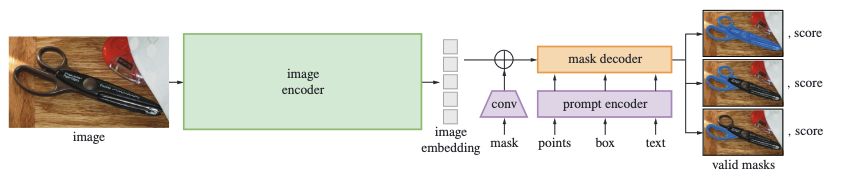
SAM
ViT
算法原理
Inpaint-Anything核心思想是结合不同模型的优势,以构建一个非常强大且用户友好的管道来解决图像修复相关问题。通过SAM处理任意物体生成mask掩码,再通过LaMa、SD等模型对mask部分进行编辑,可以实现任意物体的消除、目标替换以及背景替换等功能。

Inpaint-Anything
环境配置
mv inpaint-anything_pytorch inpaint-anything # 去框架名后缀
# docker的-v 路径、docker_name和imageID根据实际情况修改
Docker(方法一)
docker pull image.sourcefind.cn:5000/dcu/admin/base/pytorch:2.1.0-ubuntu20.04-dtk24.04.2-py3.10 # 本镜像imageID为:2f1f619d0182
docker run -it -v /path/your_code_data/:/path/your_code_data/ -v /opt/hyhal/:/opt/hyhal/:ro --shm-size=16G --privileged=true --device=/dev/kfd --device=/dev/dri/ --group-add video --network=host --name docker_name imageID bash
cd /your_code_path/inpaint-anything
pip install -e segment_anything
pip install transformers accelerate scipy safetensors
pip install -r requirements.txt -i https://pypi.tuna.tsinghua.edu.cn/simple/
# 如果pip安装下载慢建议多尝试更换镜像源(下同)
Dockerfile(方法二)
cd /your_code_path/inpaint-anything/docker
docker build --no-cache -t codestral:latest .
docker run -it -v /path/your_code_data/:/path/your_code_data/ -v /opt/hyhal/:/opt/hyhal/:ro --shm-size=16G --privileged=true --device=/dev/kfd --device=/dev/dri/ --group-add video --name docker_name imageID bash
cd /your_code_path/inpaint-anything
pip install -e segment_anything
pip install transformers accelerate scipy safetensors
pip install -r requirements.txt
Anaconda(方法三)
关于本项目DCU显卡所需的特殊深度学习库可从光合开发者社区下载安装。
DTK驱动: dtk24.04.2
python: python3.10
pytorch: 2.1.0
Tips:以上DTK驱动、python、pytorch等DCU相关工具版本需要严格一一对应
其它非深度学习库参照requirement.txt安装:
pip install -e segment_anything
pip install transformers accelerate scipy safetensors
pip install -r requirements.txt -i https://pypi.tuna.tsinghua.edu.cn/simple/
数据集
无
训练
无
推理
需要下载模型权重 SAM(sam_vit_h_4b8939.pth) 和 LaMa,或者从 https://drive.google.com/drive/folders/1ST0aRbDRZGli0r7OVVOQvXwtadMCuWXg?usp=sharing 一并下载 ,并放在 ./pretrained_models 下。
或者从SCNet下载
sam_vit_h_4b8939.pth
LaMa
注意:如果huggingface访问不通,请设置镜像网站:
export HF_ENDPOINT=https://hf-mirror.com
# 目标消除
python remove_anything.py
    --input_img ./example/remove-anything/dog.jpg
    --coords_type key_in
    --point_coords 200 450
    --point_labels 1
    --dilate_kernel_size 15
    --output_dir ./results
    --sam_model_type "vit_h"
    --sam_ckpt ./pretrained_models/sam_vit_h_4b8939.pth
    --lama_config ./lama/configs/prediction/default.yaml
    --lama_ckpt ./pretrained_models/big-lama
# 注意模型文件路径
# 目标替换
python fill_anything.py
    --input_img ./example/fill-anything/sample1.png
    --coords_type key_in
    --point_coords 750 500
    --point_labels 1
    --text_prompt "a teddy bear on a bench"
    --dilate_kernel_size 50
    --output_dir ./results
    --sam_model_type "vit_h"
    --sam_ckpt ./pretrained_models/sam_vit_h_4b8939.pth
# 背景替换
python replace_anything.py
    --input_img ./example/replace-anything/dog.png
    --coords_type key_in
    --point_coords 750 500
    --point_labels 1
    --text_prompt "sit on the swing"
    --output_dir ./results
    --sam_model_type "vit_h"
    --sam_ckpt ./pretrained_models/sam_vit_h_4b8939.pth
result
推理结果

目标消除

目标替换

背景替换
精度
无
应用场景
算法类别
AIGC
热点应用行业
推理,零售,制造,电商,医疗,教育
源码仓库及问题反馈
参考资料
- https://github.com/geekyutao/Inpaint-Anything
- https://github.com/facebookresearch/segment-anything
- https://github.com/advimman/lama
- https://github.com/CompVis/stable-diffusion
文章来源于互联网:inpaint-anything_pytorch通过SAM编辑修复任意物体的AIGC模型
相关推荐: AI写作如何避免被检测?10个去AIGC痕迹的神器
当今的数字化时代,AI在各个领域的应用越来越广泛,尤其是在文本生成领域,因此,如何确保自己的创作能够通过AI检测也成为AI使用过程中的一个重要问题。 不过不用担心,我特别整理了10款实用的工具网站,它们可以帮助优化文本,降低AI检测率,提升内容的原创性和独特性…




